
Best budget CCTV camera for home
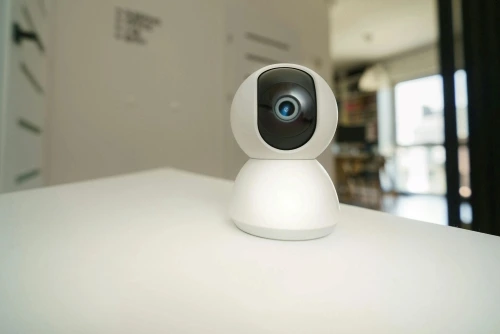
CCTV cameras are a must-have for home security. They deter crime, provide live monitoring, and record evidence during thefts or disputes. With remote access, motion alerts, and night vision, they ensure safety and peace of mind — acting as your extra set of eyes when you’re not around. Choosing the best budget CCTV camera for home helps balance security, features, and affordability.
Here are three of the best budget CCTV cameras, with reviews and comparisons
Detailed Comparison Table
| Feature | Qubo Smart Cam 360 | CP-Plus E35Q | TP-Link Tapo C210 |
| Resolution | 3MP (2K, 1296p) | 3MP Full HD | 3MP (2K, 2304 × 1296p) |
| Lens & Coverage | 360° Pan/Tilt/Zoom | 360° Pan & Tilt | 360° Pan/Tilt |
| Night Vision | IR night vision | IR up to 10m | IR night vision up to 9m |
| Smart Features | AI motion/person detection, intruder alarm | Motion alerts, Alexa/Google support | Motion tracking, AI detection (motion, person, baby crying) |
| Audio | Two-way talk with noise cancellation | Two-way talk | Two-way talk with echo cancellation |
| Storage | microSD up to 256GB + encrypted cloud | microSD up to 128GB | microSD up to 512GB + optional Tapo cloud |
| Connectivity | Wi-Fi (2.4GHz only) | Wi-Fi (2.4GHz) | Wi-Fi (2.4GHz) |
| Voice Assistant | Alexa & Google Assistant | Alexa & Google Assistant | Alexa & Google Assistant |
| Power Supply | 5V DC adapter (micro-USB) | 5V DC adapter | 9V DC adapter |
| Installation | Upright or inverted (ceiling/wall mount) | Upright or wall mount | Upright or inverted (ceiling/wall mount) |
| App Required | Qubo App | CP Plus ezyKam+ App | TP-Link Tapo App |
| Warranty | 1 year | 1 year | 1–3 years (varies by seller) |
Product’s Specs Highlights
Qubo Smart Cam 360 – Specs Highlights
- 3MP 2K resolution (1296p) with 360° pan/tilt/zoom.
- AI-powered person/motion detection + intruder alarm.
- Supports microSD up to 256GB + encrypted local cloud storage.
- Two-way audio with noise cancellation.
- IR night vision for clear low-light monitoring.
- Works with Alexa & Google Assistant.
- Power: 5V DC adapter (micro-USB).
CP-Plus E35Q – Specs Highlights
- 3MP Full HD resolution with 360° pan/tilt.
- Night vision up to 10m.
- Motion alerts + two-way audio.
- Supports microSD up to 128GB.
- Compatible with Alexa & Google Assistant.
- Compact design, easy wall/desk mounting.
- Power: 5V DC adapter.
TP-Link Tapo C210 – Specs Highlights
- 3MP 2K resolution (2304 × 1296p).
- 360° pan/tilt with motion tracking.
- AI detection (motion, person, baby crying).
- Night vision up to 9m.
- Supports microSD up to 512GB + optional Tapo cloud storage.
- Two-way audio with echo cancellation.
- Works with Alexa & Google Assistant.
- Power: 9V DC adapter.
Each products pros and cons
Qubo Smart Cam 360
- Pros:
- 2K resolution with 360° coverage.
- AI-based motion/person detection.
- Intruder alarm + smartphone alerts.
- Local cloud servers with encryption.
- Works with Alexa/Google Assistant.
- Cons:
- Limited to 2.4GHz Wi-Fi.
- Continuous recording only via SD card.
- Micro-USB (dated connectivity).
- Best for: Home users who want AI alerts and encrypted local cloud storage.
CP-Plus E35Q
- Pros:
- 3MP Full HD with 360° pan/tilt.
- Motion alerts + 2-way talk.
- Night vision up to 10m.
- Alexa & Google Assistant compatible.
- Compact design, easy installation.
- Cons:
- Storage limited to 128GB SD card.
- Slightly lower user ratings compared to rivals.
- Availability issues (often out of stock online).
- Best for: Budget-conscious buyers who want reliable performance with basic smart features.
TP-Link Tapo C210
- Pros:
- 2K (3MP) resolution with sharp video quality.360° pan/tilt + motion tracking.Supports up to 256GB SD card and cloud storage.Two-way audio, night vision, baby/pet monitoring.Alexa & Google Assistant integration.
- Higher user ratings (~4.3/5).
- Cons:
- Slightly higher price than Qubo/CP-Plus.
- Cloud storage may require subscription.
- Best for: Users who want higher storage capacity, sharper video, and reliable app support.
Step-by-Step Installation
Qubo Smart Cam 360 – Installation Steps
- Unbox – take out the camera, adapter, mounting kit, and manual.
- Choose location – place upright on a table or invert on ceiling/wall using the mount.
- Power up – connect via the included 5V micro-USB adapter.
- Download Qubo App – available on Android/iOS.
- Pair device – open app → scan QR code → connect to 2.4GHz Wi-Fi.
- Insert storage – add microSD card (up to 256GB) or enable encrypted Qubo cloud.
- Finalize setup – name device, enable AI alerts, adjust pan/tilt.
CP-Plus E35Q – Installation Steps
- Unbox – camera, adapter, mounting kit, and manual.
- Mount camera – upright on a flat surface or wall mount with screws.
- Power supply – connect via 5V DC adapter.
- Download CP Plus ezyKam+ App – available on Android/iOS.
- Pair device – open app → add camera → connect to 2.4GHz Wi-Fi.
- Insert storage – add microSD card (up to 128GB).
- Enable features – motion alerts, two-way audio, Alexa/Google integration.
TP-Link Tapo C210 – Installation Steps
- Unbox – camera, adapter, mounting kit, and manual.
- Mount camera – upright or inverted using the included kit.
- Power supply – connect via 9V DC adapter.
- Download TP-Link Tapo App – available on Android/iOS.
- Pair device – open app → add camera → connect to 2.4GHz Wi-Fi.
- Insert storage – add microSD card (up to 512GB) or enable Tapo cloud.
- Configure AI features – motion/person detection, baby crying alerts, pan/tilt tracking.
Recommendation
- Best Value: Qubo Smart Cam 360 (AI alerts + encrypted local cloud at a lower price).
- Balanced Choice: CP-Plus E35Q (affordable, decent features, but limited storage).
- Premium Pick: TP-Link Tapo C210 (better resolution, storage, and user ratings).
If you prioritize video clarity and storage, go for Tapo C210. If you want AI-driven alerts at a lower cost, Qubo Smart Cam 360 is ideal. For a budget-friendly, reliable option, CP-Plus E35Q works well.